We can put the audio in 5.1 OK
We can put the music on the rear speakers
It’s a bit laborious, but we can do it
But how do we adjust the volume of each channel: the two front speakers, the center speakers, the bass speakers, and the two rear speakers?
I haven’t found it.
Thanks
The Balance audio filter includes fading, which is the English term for front-back.
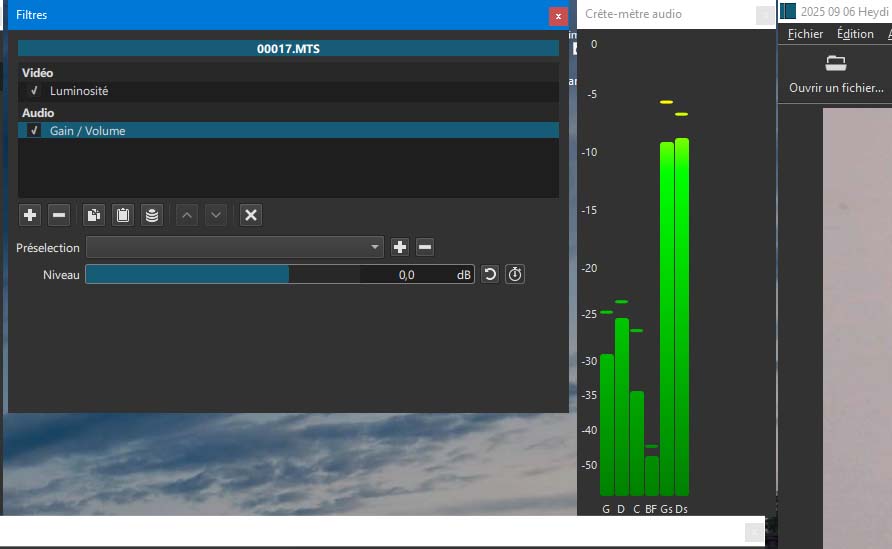
The Gain/Volume audio filter includes Channels mask buttons for which channels to affect.
Explained a bit in release notes for a recent version Shotcut - New Version 25.07: Hot Hot Hot
Thank you for your quick response.
I’ll take a closer look.
But maybe my version doesn’t have the Channels mask buttons.
I have version 24.09.13.
The ability to change the volume for each channel must have been increased in the version you indicated.
It’s not a major drawback, as it’s actually quite rare to have to make this type of adjustment (useful if you want to build your own 5.1 system).
No Channel mask buttons in my photo.
You seem to have trouble reading what I wrote. Release notes are about a specific version. That version is clear both at the top of the page and in the link.
WELL DONE!!!
I opened the latest portable version.
The adjustment knobs for each channel are there.
I’ll share the information on my French forum.
You did an excellent job.
Haven’t tested it yet, but I think it should work.
Merci !!! en français …LAUGH
1 Like
No problem, Google Translate isn’t too bad.
But I got the latest version, the 25/08.
The volume of each channel is well managed.
One question:
Can the portable version without installation use the graphics card?
Not really a concern for me because ShotCut isn’t my main software.
I’m picking it up to recommend it as one of the best free editing software on the Repaire forum.
You did an excellent job, congratulations..
Yes
Thank you so much
I created a thread in the Digital Lair to discuss your latest release.
A forum administrator who used ShotCut wrote this:
What I’d like to achieve (and I’m sure I’m not the only one) is to get back the command to activate a second external display, as it was before.
The last version that offered this (before it was removed) was version 22.12.21. It wasn’t yesterday. Nothing has happened since.
On that version, the command was: “setting”>drive>external monitor.
So, I don’t understand why this command disappeared.
Have you reinstated this feature for full-screen viewing on a second monitor?
For me, it’s not a problem because I can get almost full-screen viewing on a 30" Dell by putting all the windows on my 24" monitor (it’s 2560x1600, which helps a bit).
Best regards,