Divides the clip into a repeated tiled layout, displaying multiple scaled copies of the same video in a regular grid.
The filter duplicates the source image spatially; it does not crop different regions of the frame. Every cell shows the entire clip, scaled to fit.
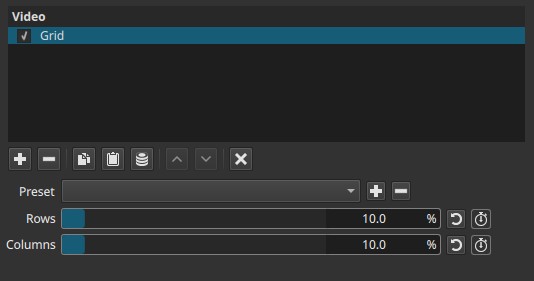
Grid is a spatial replication effect, not a layout or masking tool.
Parameters
Rows (0.0 - 100.0%)
Controls the number of vertical divisions in the grid.
-
0.0%
No vertical subdivision. The clip is shown once, filling the frame. -
Low values (≈5 - 15%)
A small number of rows. On a 1080p project, the default value (10%) typically results in 3 rows. -
Higher values
More rows are added. Each tile becomes shorter vertically as the grid density increases.
Important behavior notes:
- The percentage value does not correspond directly to a row count.
- The mapping is non-linear and resolution-dependent; exact row numbers cannot be inferred from the slider value.
- Increasing Rows reduces the vertical resolution of each tile.
Columns (0.0 - 100.0%)
Controls the number of horizontal divisions in the grid.
-
0.0%
No horizontal subdivision. The clip is shown once, filling the frame. -
Low values (≈5 - 15%)
A small number of columns. At the default value (10%), this typically results in 3 columns on a 1080p project. -
Higher values
More columns are added. Each tile becomes narrower as the grid density increases.
Important behavior notes:
- Like Rows, the percentage does not map linearly to a column count.
- The effective number of columns depends on project resolution.
- Increasing Columns reduces the horizontal resolution of each tile.
Keyframes
Both Rows and Columns can be keyframed.
This enables:
- Animating from a single full-frame view into a tiled grid
- Dynamic changes in grid density over time
- Zoom-like transitions that break the frame into multiple repeating views
Parameter interaction
Rows and Columns are independent but cumulative:
- Increasing both increases the total number of tiles multiplicatively (rows × columns).
- Increasing only one creates a strip layout (vertical or horizontal repetition).
- High values on both sliders can rapidly reduce per-tile clarity due to downscaling.
Visual characteristics
- Repeated copies of the same video filling the frame
- Uniform grid with equal-sized tiles
- All tiles remain time-synchronized
- No borders or spacing between tiles
- Image detail decreases as grid density increases
Recommended use cases
- Stylized visual effects or motion graphics
- Abstract or experimental repetition patterns
- Visual emphasis on rhythm or motion
- Transitions from a single image to a multi-view layout
- Background textures using animated video content
Limitations
- Cannot display different parts of the image in different cells
- No direct numeric control over exact row or column count
- No control over spacing, borders, or offsets
- High grid densities can make motion hard to read due to heavy downscaling