Adds a time-delayed repetition of the audio signal, creating echo-like effects ranging from subtle spatial depth to pronounced rhythmic repeats.
The filter mixes delayed audio back into the original signal and can optionally feed repeats back into the delay line.
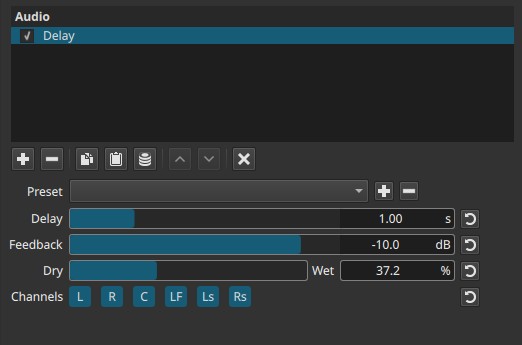
Delay is a temporal audio effect evaluated over time.
Parameters
Delay (0.00 - 4.00 s (second))
Sets the time offset between the original signal and the delayed signal.
-
Very low values (≈0.00 - 0.05 s)
Short delays that can thicken sound or create a doubling/comb-filter-like character. -
Short to mid values (≈0.05 - 0.50 s)
Audible echoes that add space or rhythmic emphasis. -
Long values (≈0.50 - 4.00 s)
Distinct, separated repeats suitable for dramatic echo effects.
Behavior note:
- Delay time determines when repeats occur, not how loud they are.
Feedback (-70.0 - 0.0 dB)
Controls the gain applied to the delayed signal before it is fed back into the delay line.
The value is expressed in decibels (dB), meaning it represents a gain reduction, not a percentage.
-
-70.0 dB
The feedback signal is effectively muted.
The delayed signal is not fed back, resulting in a single echo only. -
Lower negative values (e.g. -40 to -20 dB)
The feedback signal is strongly attenuated.
Each repeat is much quieter than the previous one, producing a few rapidly decaying echoes. -
Higher values (e.g. -10 to -3 dB)
The feedback signal is only slightly attenuated.
Repeats decay slowly, producing many audible echoes. -
0.0 dB
No attenuation is applied to the feedback signal.
Each repeat is fed back at full level, which can result in very long decay or sustained resonance.
Note:
- Feedback is expressed in decibels because it controls the gain applied to the delayed signal before it is re-injected into the delay line.
- High feedback values can cause prolonged ringing or runaway echo, especially with short delay times.
Dry → Wet (0.0 - 100.0%)
Controls the mix between the original (dry) signal and the delayed (wet) signal.
-
0.0%
Original signal only. -
50.0%
Equal mix of dry and delayed audio. -
100.0%
Delayed signal only.
Channel selection (toggle buttons)
Determines which audio channels the delay is applied to.
These buttons are toggle switches.
Note
Available buttons depend on the project’s audio channel configuration in
Settings > Audio Channels.
- L — Front Left
- R — Front Right
- C — Center
- LF — Low-Frequency Effects (LFE)
- Ls — Surround Left
- Rs — Surround Right
Each channel can be enabled or disabled independently.
Auditory characteristics
- Audible echoes or repeats following the original sound
- Increased sense of space or depth at moderate settings
- At short delay times with high feedback, a resonant or metallic tone may appear
- High feedback can produce long decays or continuous echo tails
What the Delay filter produces
- Echoes / repeats of the original signal
- Resonance or ringing at short delay times combined with high feedback
- Metallic or comb-filter-like coloration in extreme settings
What it does not produce
- No random noise is generated
- No hiss or grain is added by the filter itself
Any harsh or unstable sound comes from feedback accumulation, not noise generation.
Recommended use cases
- Adding depth or ambience to dialogue or effects
- Creating rhythmic echo effects on music or sound design
- Simulating distance or reflections
- Stylized or dramatic audio emphasis
- Channel-specific echoes in surround mixes
Usage notes and tips
- Start with short delay times and low feedback for subtle enhancement.
- Use Dry → Wet to control presence without changing delay timing.
- Be cautious with high feedback; monitor output levels.
- In surround projects, applying delay only to surround channels can enhance immersion without affecting clarity.
Limitations
- No tempo synchronization
- No keyframe support
- High feedback can cause excessive ringing
- Delay time is fixed during playback