Displays an audio-reactive light shape that pulses in intensity based on the audio signal.
The result is a soft, glowing, ellipsoid-like gradient that brightens and dims over time, rather than a meter or spectrum that follows specific frequencies or waveforms.
This filter is intended for ambient, abstract audio visualization, not for precise audio analysis.
Important requirement (mandatory)
The audio must be part of a video clip on a video track.
- The filter reads audio only from a video clip that also provides video frames.
- A normal video with embedded audio works.
- A static image or album cover with embedded audio (e.g. music + cover art) also works.
- Audio-only clips, even if placed on a video track, do not drive this filter.
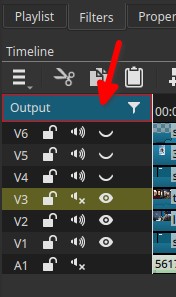
- But, when applied to the Output, the filter uses the project’s mixed audio and runs for the entire duration of the timeline.
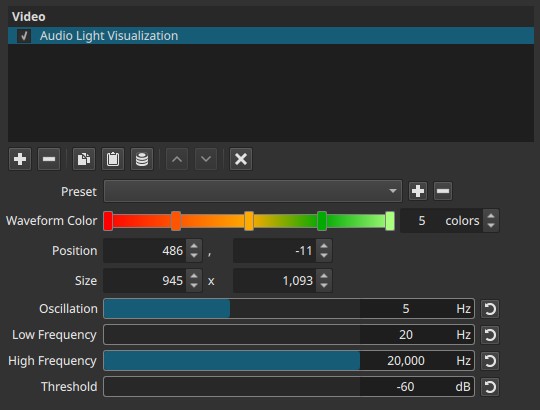
Parameters
Waveform Color (1 - 10)
Defines the color gradient of the light visualization.
-
You must explicitly choose the number of colors (1 to 10).
-
Click the horizontal color bar to:
- Set colors
- Adjust intermediate color stops
Important behavior
- One color → uniform glow
- Multiple colors → smooth gradient transitions within the light shape
Position (X, Y)
Controls the on-screen position of the visualization.
- Adjustable numerically
- Can be moved directly in the preview window
Size (Width, Height)
Defines the bounding area in which the light visualization is drawn.
- Adjustable numerically
- Can be resized interactively in the preview
The light shape is always constrained to this rectangle.
Oscillation (0 - 10 Hz)
Controls the base pulsing rate of the light.
-
Low values
Slow, smooth breathing-like motion -
Higher values
Faster flickering or pulsing
Important behavior
- Oscillation defines the temporal rhythm of the effect.
- Audio intensity modulates this motion rather than replacing it.
Note:
- Oscillation sets how fast the light wants to pulse; audio loudness controls how strong the pulse becomes.
Low Frequency (20 Hz - 19 900 Hz)
Defines the lowest frequency considered when measuring audio intensity.
- Raising this value ignores bass content
- Useful to avoid low-frequency dominance
High Frequency (120 Hz - 20 000 Hz)
Defines the highest frequency considered.
- Lowering this value limits the effect to bass and mids
- Higher values include treble energy
Threshold (−60 to 0 dB)
Sets the minimum audio level required to trigger visible response.
-
Lower values
More sensitive; quiet audio produces visible light -
Higher values
Less sensitive; only louder passages trigger strong response
Note:
- This effect is time-based and audio-driven; it must be evaluated during playback, as no motion is visible on a paused frame.
Keyframes
This filter does not support keyframes.
All animation is driven by:
- The audio signal
- The Oscillation setting
Visual characteristics
- Soft, glowing, ellipsoid-like gradient
- Pulsing brightness rather than discrete motion
- No frequency-by-frequency display
- Best evaluated during playback
The visualization reacts primarily to overall intensity (loudness), not to rhythm details or pitch structure.
Recommended use cases
- Ambient music visuals
- Background motion for static imagery
- Minimalist audio-reactive overlays
- Atmospheric or abstract video styles
Limitations
- Requires audio embedded in a video clip
- Not a waveform or spectrum analyzer
- No per-channel or per-band control
- UI elements are rendered into the video