

The Reflect filter mirrors the image by splitting the frame along a selected edge axis and flipping one half to create a reflection.
When used alone, the reflection axis is fixed at the center of the image, and one half of the frame is mirrored onto the other.
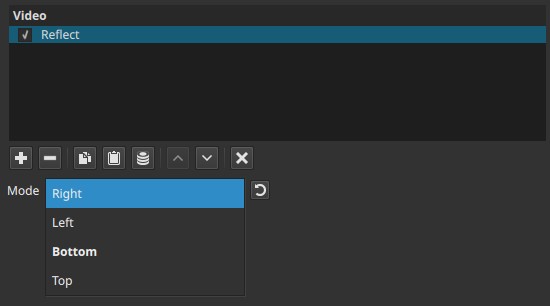
This filter operates spatially and does not modify color or transparency.
Parameter
Direction
Selects which side of the image is used as the source for the mirror, determining which half of the frame is duplicated onto the other.
Available options:
-
Right
The right half of the image is reflected onto the left half -
Left
The left half of the image is reflected onto the right half -
Bottom
The bottom half of the image is reflected onto the top half -
Top
The top half of the image is reflected onto the bottom half
The reflection is generated by flipping the image content across the chosen edge.
Visual characteristics
- Produces a mirrored version of the image
- Reflection is symmetrical relative to the selected edge
- No scaling, fading, or blending is applied by this filter alone
- The reflected area is a direct flip of the source content
Recommended use cases
- Creating mirror or symmetry effects
- Filling empty frame areas with reflected content
- Stylized layouts and graphic compositions
- Background extension effects
Workflow note: combining with Size, Position & Rotate
For greater control over where the reflection appears, use the Size, Position & Rotate filter before the Reflect filter in the filter list.
When Size, Position & Rotate is placed above Reflect:
-
The image can be resized or repositioned first
-
The reflection is applied after those transformations
-
This allows precise control over:
- Reflection placement
- Visible reflected area
- Composition balance
Filter order matters: Reflect always mirrors the result of all filters applied above it.
Limitations
- No adjustable reflection strength or opacity
- No gradient or fade control
- Reflection direction is discrete (fixed choices)
- Effect depends on prior transformations in the filter chain