

Opens a professional video capture device from Blackmagick Design that provides SDI or HDMI inputs. These devices are either PCIe cards installed in a desktop machine or Thunderbolt peripherals to be used with Macs and high end Windows laptops.
This allows Shotcut to record from external sources instead of importing media files.
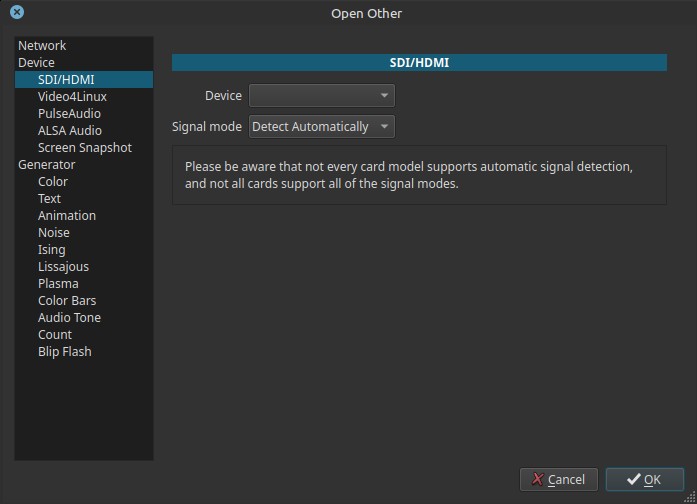
What SDI / HDMI capture is
SDI (Serial Digital Interface) and HDMI are standards used to transmit uncompressed digital video from cameras, mixers, or playback devices.
Typical sources include:
- Broadcast cameras
- Video switchers
- External recorders
- Playback decks
- Professional capture cards (PCIe or external)
Shotcut accesses these devices through the system’s capture framework and underlying drivers.
Scope and behavior
-
Device availability depends on:
- Installed capture card
- operating system driver support
- If no supported device is detected, the Device field may appear inactive.
-
Opens as a live video in the Source player
-
At this point you can confirm things are working, audio/video levels, and microphone & camera placement
-
Use the Export panel to record to a file
-
This cannot be used as the input for Timeline > Record Audio
Controls
Device
Selects the SDI/HDMI capture device.
-
Displays only supported capture cards
-
May be inactive if:
- No compatible card is installed
- Drivers are missing or inactive
This control is unrelated to display screens or monitors.
Signal mode
Defines the expected video signal format.
Options include:
- Detect Automatically
- HD formats (720p, 1080i, 1080p)
- SD formats (NTSC, PAL)
- UHD formats (2160p / 4K)
Each entry specifies:
- Resolution
- Scan type (progressive or interlaced)
- Frame rate
Signal mode explained
Detect Automatically
Shotcut asks the capture device to detect the incoming signal format.
This is the most convenient option, but:
- Not all cards support auto-detection
- Detection may fail or misidentify the signal
Manually selected modes
When a specific mode is chosen:
-
Shotcut expects the input signal to exactly match
-
Mismatched settings can result in:
- No video
- Garbled image
- Capture failure
Manual selection is often required for older or simpler cards.
Warning note:
Not every card model supports automatic signal detection, and not all cards support all signal modes.
This is a hardware limitation, not a Shotcut limitation.
Typical use cases
- Live capture from professional cameras
- Ingesting output from video mixers
- Recording SDI feeds from broadcast equipment
- Capturing HDMI output from external devices
- Studio or live production workflows
Usage notes and tips
- Verify the exact output format of the source device.
- If auto-detect fails, select the signal mode manually.
- Ensure the capture card supports the chosen resolution and frame rate.
- SDI and HDMI audio handling depends on the capture card.
- Test capture before long recordings.
Limitations
- Requires dedicated capture hardware
- Hardware and driver dependent
- Incorrect signal mode prevents capture
- Not suitable for consumer webcams or displays