

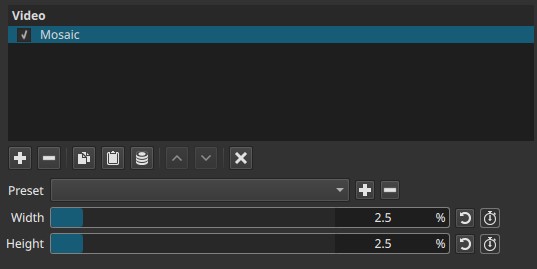
Divides the image into rectangular blocks and replaces each block with a single averaged color.
The result is a pixelated, low-resolution appearance where fine detail is intentionally removed.
The term mosaic reflects a long-standing image construction principle: building pictures from discrete units rather than continuous detail. Ancient mosaics used small, uniformly shaped pieces (tesserae) to form larger images, a logic later echoed in early color photography where images were filtered through dense grids of tiny colored elements. Modern digital mosaic effects apply the same idea computationally by grouping pixels into visible blocks.
Over time, the look became a deliberate tool for obscuring detail or stylizing footage, particularly in broadcast and documentary contexts.
Parameters
Width (0.0% - 20.0%)
Controls the horizontal block size as a percentage of the image width.
-
0.0
No horizontal pixelation. -
Low values (1.0 - 5.0)
Fine pixelation with partial detail retention. -
Medium values (6.0 - 12.0)
Clear block structure; faces and text become difficult to identify. -
High values (13.0 - 20.0)
Very coarse blocks; only large shapes and colors remain.
This parameter defines how many pixels are grouped left-to-right into a single block.
A value of 10% means each mosaic block spans roughly one-tenth of the frame width.
Height (0.0% - 20.0%)
Controls the vertical block size as a percentage of the image height.
-
0.0
No vertical pixelation. -
Low values (1.0 - 5.0)
Subtle vertical grouping. -
Medium values (6.0 - 12.0)
Strong vertical block structure. -
High values (13.0 - 20.0)
Extremely coarse vertical grouping.
This parameter defines how many pixels are grouped top-to-bottom into a single block.
A value of 10% means each mosaic block spans roughly one-tenth of the frame height.
Keyframes
Both Width and Height can be keyframed.
This enables:
- Tracking moving subjects when combined with a mask
- Gradual reveal or conceal of detail
- Dynamic censorship or stylized transitions
Parameter interaction
- Width and Height operate independently.
- Equal values produce square blocks.
- Unequal values produce rectangular blocks, which may better match faces, license plates, or signage.
The effective loss of detail is dominated by the larger of the two values.
Visual characteristics
- Hard-edged rectangular blocks
- Each block uses the average color of its underlying pixels
- Complete removal of fine detail within blocks
- No blur or transparency; edges remain discrete
This is a purely spatial effect with no temporal behavior.
Recommended use cases
- Obscuring faces, license plates, or sensitive information
- Anonymizing individuals in documentary or journalistic footage
- Intentional low-resolution or abstract visual styles
Face or object hiding (with Mask: Simple Shape)
When combined with Mask: Simple Shape:
- Apply Mosaic to the clip
- Add Mask: Simple Shape above it
- Add Mask: Apply below it (to see the effect)
- Restrict the mosaic to a defined region
- Keyframe the mask to follow the subject if needed
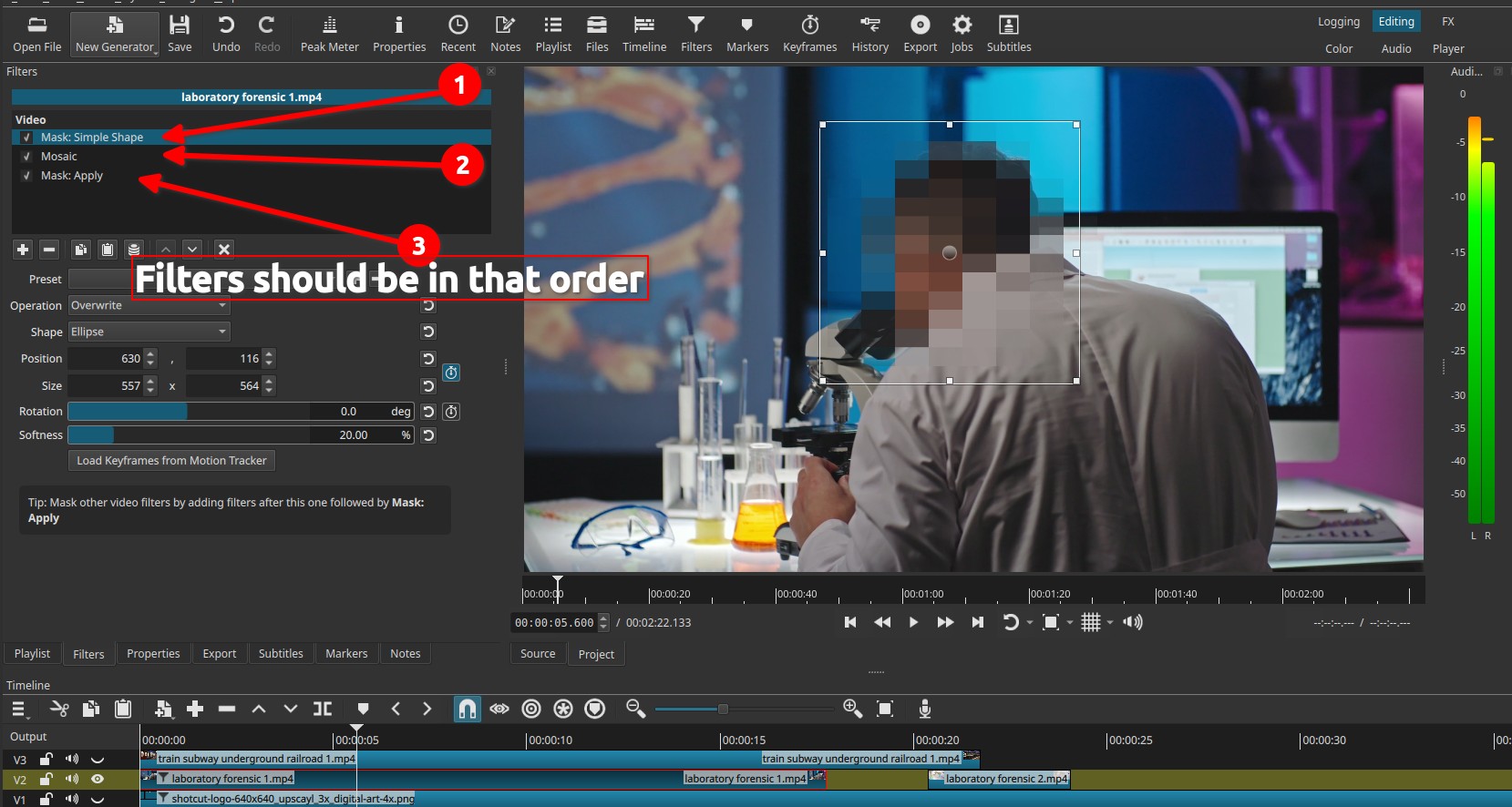
This approach allows localized obfuscation while preserving detail elsewhere.
It available as Filter Set > Obscure With Mosaic that comes with Shotcut.
Limitations
- No automatic subject or face detection
- Block size is abstract and not expressed in pixels
- No control over block shape beyond Width and Height
- Coarse blocks may still reveal motion through color changes