

Applies a graphic equalizer with 15 fixed frequency bands, allowing precise adjustment of tonal balance across the audible spectrum.
Each band boosts or attenuates a specific frequency range, shaping how bass, mids, and treble are perceived.
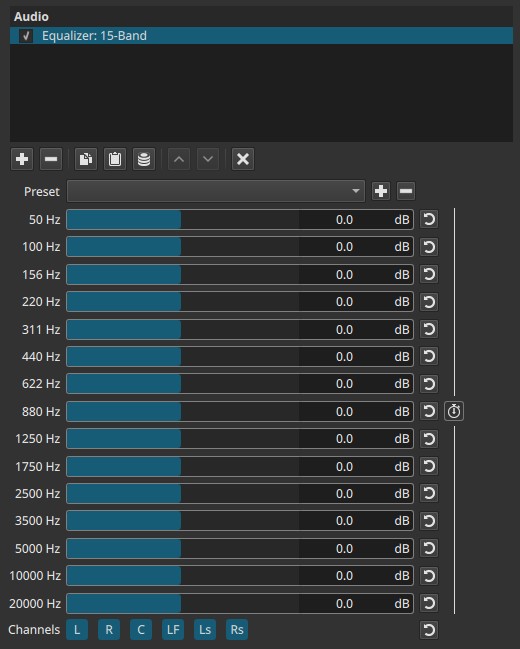
This filter operates in the frequency domain. All band controls are keyframeable as a group, not individually.
Parameters
Frequency bands
Each slider controls gain (±20 dB) for a fixed frequency band.
Positive values boost that range; negative values attenuate it.
Below is an explanation of what each band typically affects.
These descriptions are indicative only; real content often spans multiple bands.
50 Hz
Very low bass.
- Felt more than heard
- Sub-bass, rumble, impact
- Too much can sound boomy or cause speaker stress
Examples: deep bass effects, explosions, very low musical notes
100 Hz
Bass body.
- Weight and fullness
- Excess can sound muddy
Examples: bass guitar, kick drum body, low warmth in voices
156 Hz
Upper bass / low warmth.
- Adds thickness
- Too much reduces clarity
Examples: male voice warmth, lower instruments
220 Hz
Low-mid transition.
- Body of many sounds
- Can easily sound boxy
Examples: lower speech resonance, room tone
311 Hz
Low mids.
- Important for natural tone
- Excess often causes muddiness
Examples: voice body, acoustic instruments
440 Hz
Midrange foundation.
- Tonal balance area
- Can sound nasal if over-boosted
Examples: general speech tone, many instruments
622 Hz
Midrange clarity.
- Improves intelligibility
- Overuse can sound honky
Examples: spoken voice definition
880 Hz
Upper midrange.
- Presence and articulation
- Too much can sound harsh
Examples: consonants in speech, instrument attack
1250 Hz
Presence region.
- Speech intelligibility
- Helps sounds “cut through”
Examples: dialogue clarity, lead instruments
1750 Hz
Upper presence.
- Detail and bite
- Excess can fatigue the ear
Examples: crisp speech, edge in vocals
2500 Hz
High-mid presence.
- Sharpness and attack
- Sensitive range for human hearing
Examples: speech intelligibility, clarity boost
3500 Hz
Definition and bite.
- Enhances detail
- Can become aggressive quickly
Examples: dialogue articulation, string attack
5000 Hz
High presence.
- Brilliance and detail
- Too much causes sibilance
Examples: “s” sounds, cymbal detail
10 000 Hz
Treble.
- Air and brightness
- Excess sounds hissy
Examples: sparkle in music, vocal air
20 000 Hz
Extreme high frequencies.
- Mostly air and sheen
- Often inaudible on many systems
Examples: subtle brightness, high-end polish
Keyframes (grouped)
All 15 sliders are keyframed together.
- Individual bands cannot be animated independently.
- Keyframes store the entire EQ curve at each point in time.
This enables:
- Tonal changes over time
- Scene-dependent EQ
- Gradual transitions between different EQ shapes
Channel selection
Determines which audio channels the equalizer is applied to. They are toggle switches.

Available buttons depend on the project’s audio channel configuration: Settings > Audio Channels
- L — Front Left
- R — Front Right
- C — Center
- LF — Low-Frequency Effects (LFE)
- Ls — Surround Left
- Rs — Surround Right
Note:
Independent equalization per channel requires adding separate instances of the Equalizer filter, each targeting different channels.
Auditory characteristics
- Changes tonal balance, not loudness alone
- Boosting multiple adjacent bands increases perceived fullness
- Excessive boosts can introduce harshness or resonance
- Large cuts can make audio sound thin or distant
Recommended use cases
- Improving dialogue clarity
- Reducing muddiness or harshness
- Enhancing bass or brightness
- Matching tonal balance between clips
- Channel-specific EQ in surround mixes
Usage notes and tips
- Start with small adjustments (±2 - 4 dB).
- For dialogue:
- Reduce low bands (50 - 200 Hz) to remove rumble
- Gently boost 1 - 3 kHz for intelligibility
- For bass-heavy content:
- Boost low bands carefully
- Avoid excessive overlap into low mids
- If the sound becomes harsh or fatiguing, reduce high-mid bands first.
- Always evaluate changes during playback.
Limitations
- Fixed frequency bands (no custom frequencies)
- No Q (bandwidth) control
- Grouped keyframes only
- Extreme boosts can cause distortion or listener fatigue