

Reduces the dynamic range of an audio signal by attenuating levels that exceed a defined threshold.
Loud sounds are reduced, while quieter sounds are left unchanged, resulting in more consistent overall loudness.
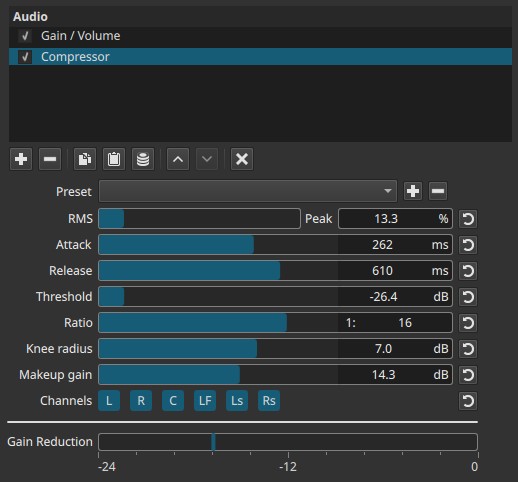
This compressor operates in the amplitude domain and is applied continuously over time.
Parameters
RMS → Peak (0.0 - 100.0%)
Controls how the compressor detects signal level.
Lower values = smoother, more musical compression.
Higher values = tighter control of peaks.
-
0.0% (RMS)
Detection is based on average signal energy.
Compression reacts smoothly and is less sensitive to short transients. -
100.0% (Peak)
Detection is based on instantaneous peaks.
Compression reacts quickly to sharp transients. -
Intermediate values
Blend between RMS and Peak behavior.
Attack (2 - 400 ms)
Controls how quickly compression begins after the signal exceeds the threshold.
-
Short attack
Quickly reduces transients (drums, plosives). -
Long attack
Allows transients to pass before compression engages.
Release (2 - 800 ms)
Controls how quickly compression stops after the signal falls below the threshold.
-
Short release
Compression disengages quickly; can sound aggressive or “pumping”. -
Long release
Smoother, more natural recovery.
Threshold (-30 to 0 dB)
Sets the level above which compression is applied.
-
Lower values
More of the signal is compressed. -
Higher values
Only loud peaks are affected.
Ratio (1:1 to 1:20)
Defines how much the signal is reduced once it exceeds the threshold.
-
1:1
No compression. -
1:2 to 1:4
Gentle to moderate compression. -
1:8 to 1:20
Strong compression, approaching limiting.
Knee radius (1 - 10 dB)
Controls how smoothly compression transitions around the threshold.
-
Low values
Hard knee: compression engages abruptly. -
High values
Soft knee: compression engages gradually.
Soft knees are often perceived as more natural.
Makeup gain (0.0 - 24.0 dB)
Boosts the output level after compression.
- Used to restore loudness lost due to gain reduction.
- Does not affect how compression is calculated.
Channel selection (toggle buttons)
Determines which audio channels the compressor is applied to.
These buttons are toggle switches.
Note
Available buttons depend on the project’s audio channel configuration in
Settings > Audio Channels.
- L — Front Left
- R — Front Right
- C — Center
- LF — Low-Frequency Effects (LFE)
- Ls — Surround Left
- Rs — Surround Right
Each button enables or disables compression on that channel independently.
Gain Reduction meter (visual indicator)
A visual-only meter labeled Gain Reduction (-24 dB to 0 dB) shows how much level is being reduced by the compressor.
Important behavior notes:
- It reflects reduction, not output level.
- To see meaningful movement, sufficient input level is required; a Gain / Volume or other level-adjusting filter can appear earlier in the filter chain if needed.
- Without sufficient input level, the meter may remain static even if the compressor is active.
The meter is informational only.
Visual / auditory characteristics
- Reduced volume differences between loud and quiet sections
- More consistent perceived loudness
- Potential reduction of transients depending on settings
- Overuse can produce pumping or flattened dynamics
Recommended use cases
- Leveling dialogue
- Controlling peaks in music or sound effects
- Reducing dynamic swings in narration
- Preparing audio for broadcast or online delivery
- Channel-specific dynamics control in surround mixes
Usage notes and tips
- Start by setting Threshold and Ratio first.
- Use Attack and Release to shape transient behavior.
- Prefer RMS-heavy detection for dialogue and music.
- Use Makeup gain sparingly to restore loudness.
- Watch the Gain Reduction meter to avoid over-compression.
Limitations
- No sidechain input
- No lookahead control
- No keyframe support
- Meter depends on upstream signal level